
Intro
Welcome to ROC26! “Rock Twenty Six”
The United Kingdom Bunkers on the Air (UKBOTA) Royal Observer Corps (ROC) 2026 Event (ROC26 for short) is a major event in the UKBOTA calendar.
Not only will ROC26 be our fourth ROC event, as UKBOTA, but it also marks our third birthday. UKBOTA, in its current form, was born on 1st October 2023 with the launch of the 2023 ROC event. The history of Bunkers on the Air (BOTA) of course goes back many decades (with thanks to many people, including Brian G8GMU and Chris M0DOL). From the very beginnings of BOTA, and now UKBOTA, it was always linked to remembering the important history of the ROC. More information on the Royal Observer Corps can be found in the information section at the bottom of this page. The videos are worth a watch.
Duration
The ROC26 event runs throughout the entire month of October 2026
Why do UKBOTA have a Royal Observer Corps (ROC) Event
This event exists to shine a light on one of the least visible parts of Britain’s Cold War history — the underground network of the Royal Observer Corps. For over four decades, more than 1,500 small concrete posts and their supporting Group Headquarters stood ready across the length and breadth of the United Kingdom, manned by volunteers trained to do one job: detect a nuclear detonation and track its fallout, so that a warning could reach the population in time to matter. It was a role built entirely on the hope that it would never be needed, carried out in near-total obscurity, in cramped underground chambers with no running water or mains power, by ordinary people who gave up their evenings and weekends for a threat most of the country chose not to think about.
This event exists as a tribute to those men and women — to the quiet, unglamorous readiness they maintained year after year, and to the network of posts and headquarters they built and staffed. By seeking out these bunkers today, transmitting from them, and making contact with operators around the world, we keep their purpose alive in a different form: not watching for the worst, but reaching outward in the ordinary, hopeful way that amateur radio has always done best.
Every activation is a small act of remembrance — a chance to stand where they stood, understand what they were prepared to do, and make sure their service is not forgotten.
What was a ROC monitoring Post and what was a Master Post?
Royal Observer Corps underground monitoring posts were built in clusters, typically of three to four posts, spread a few miles apart across the country. Within each cluster, one post was designated the “Master Post.” These posts were numbered from ten upward at intervals of five (10, 15, 20, and so on), usually starting in the north of the area and working down, left to right. The Master Post’s defining feature was better communications equipment than its neighbours. While every post had a landline-based loudspeaker telephone connecting it to the other posts in its cluster and up to Group HQ, the Master Post also carried a VHF radio, giving it a backup means of reaching Group Headquarters if the landline failed. In practice, this meant the Master Post acted as the communications hub for its cluster during an alert, relaying reports onward when normal links were down. Otherwise, the posts within a cluster were functionally identical: same design, same monitoring instruments, same three-observer crew, and the same task of reporting nuclear bursts and fallout readings during a “manning up” period ahead of feared hostilities.
What was a Group HQ and what was its role?
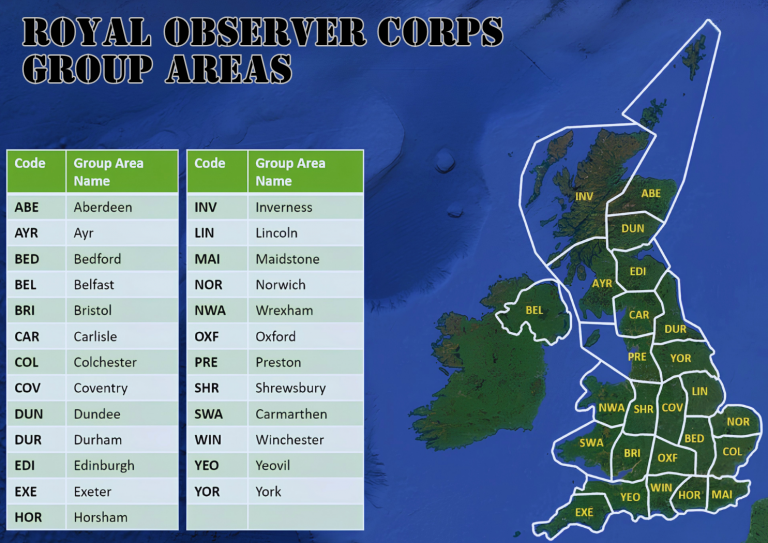
Above the network of underground posts sat the Group Headquarters, one per “Group” — a geographic area made up of roughly 20 to 40 posts and a HQ. Groups of posts were themselves organised into “Sectors,” each covering roughly four to five Groups. Unlike the small underground observer posts, Group Headquarters were substantial protected bunkers to support this tier of command. A Group HQ received and collated reports coming in from all the posts and clusters in its area, plotted the plume and fallout picture, and passed consolidated warnings up the chain to Sector Control and the wider UK Warning and Monitoring Organisation (UKWMO). It was staffed by a mix of Royal Observer Corps officers and support personnel, on a much larger scale than a single post, with dedicated plotting rooms, communications equipment, and facilities for sustained underground operation. Group HQ was effectively the nerve centre translating raw observer data into an actionable regional warning picture. In theis event we recognise the final 25 Group HQ. Each Group area is identified by a 3 figure code, e.g. LIN for LINCOLN Group. Whilst not formally a Group HQ, ROC Bentley Priory, as overall ROC HQ is included for scoring purposes as a Group HQ.
Note: Some areas have more than one Group HQ bunker, this reflects changes in the ROC organisational structure over the years.
ROC26 Reference list
What is this list?
Every ROC (Royal Observer Corps) Bunker currently on record, shown as a searchable, sortable table with a companion map. Use the buttons above the table to switch between all bunkers, Master Posts only, and Group HQ bunkers only — on small screens these collapse into a single dropdown. The table shows a brief "Loading ROC bunkers…" message while the data fetches; if it cannot load at all, it will say so and ask you to refresh.
Row and marker colour key
| ROC Group HQ — dark blue row, map pin, and popup header, white text. | |
| Master Post — light blue row, map pin, and popup header. | |
| Standard ROC Post — plain white row, grey map pin, light grey popup header. | |
| Bright yellow — used for the Bonus column and the popup bonus footer. | |
| Black (yellow on satellite) — the 1000m radius circle drawn around every bunker. | |
| Pale yellow — a non-ROC bunker, only shown when the map's Non-ROC toggle is switched on. |
Every marker on the map is a small coloured pin, so post type is visible at a glance without opening a popup — a dark pin for Group HQ, light blue for Master Post, and grey for a standard post.
Bonus column
Master Posts score +3, Group HQ bunkers score +5. Standard posts show no bonus. A bunker that qualifies as both a Group HQ and a Master Post is always counted as a Group HQ.
Table columns
Locator is the Maidenhead grid locator. Grid Ref is the OS National Grid reference (or Irish Grid for Northern Ireland references containing "GI-"). ROC HQ is the short code for the ROC Group area the bunker belongs to (e.g. BED, OXF, WIN). Nearest Postcode is for general location reference only, not a precise address.
Jumping to the map
Click any bunker Reference or Name in the table (both shown in blue) to open the ROC26 Map, zoomed and centred on that exact bunker with its popup already open. Clicking any marker directly on the map also re-centres the map on it.
Bunker popups
Each popup header is coloured by post type (see the colour key above) and shows the Reference. Coordinates are shown as a plain pair, e.g. 51.88734, 0.88295. A yellow bonus footer appears on Master Post and Group HQ popups only. Every popup — including non-ROC bunkers shown via the map's Non-ROC toggle — also has an Open in Waze button, which opens Waze and starts turn-by-turn directions to that bunker from your current location (Waze always uses live GPS as the starting point; there is no way to set a different starting point via this link).
The ROC26 Map
Markers are grouped into clusters when zoomed out — click a cluster to zoom in, or zoom further to see individual bunkers. Each bunker also shows a faint 1000m radius circle, shown in black on the street map and yellow on satellite view for contrast. The dropdown in the map header filters markers down to a single ROC HQ code; it stays in sync with the ROC Code dropdown above the table, so changing one updates the other.
Four buttons sit in the top-right of the map: Sat switches between the street map and Esri satellite imagery (the label changes to Map to switch back), Find Me (red) uses your browser's geolocation to drop a marker on your current position and centre the map there — your browser will ask permission first, and this only works on a secure (https) connection, showing a small banner if it fails for any reason — Non-ROC (off by default) reveals every other bunker the API returns that is not classed as a ROC Bunker, shown as pale yellow pins with a "NOT ROC BUNKER" popup footer, useful for double-checking nothing has been missed from the ROC list — and Group Areas (off by default, purple) draws the 25 ROC Group Area boundary polygons on the map, each with a popup showing its code and name.
The map only closes when you press the × button in its header — clicking outside it or pressing Escape will not close it, to avoid losing your place by accident.
Download KML
The purple Download KML button exports the complete ROC bunker list (never affected by the current search or filter) as a .kml file for Google Earth or similar mapping software, organised into folders by ROC HQ code. Pins use the same grey/light blue/dark blue colour scheme as Standard/Master/Group HQ posts, each with its own 1000m radius circle, and clicking a pin shows the same details as the in-app popup. KML icon shapes are limited by the format itself, so the pins look slightly different from the web map, but the colour meaning is the same. The file also includes a separate folder with the 25 ROC Group Area boundary polygons.
Searching and filtering
The Search box searches every column at once. The ROC Code dropdown above the table filters to an exact ROC HQ code. The three buttons (or the dropdown they collapse into on small screens) filter by post type.
| Reference | Name | Type | Lat | Long | Locator | Grid Ref | ROC HQ | Nearest Postcode | Bonus |
|---|---|---|---|---|---|---|---|---|---|
| Loading ROC bunkers… | |||||||||
Note: Other UKBOTA bunker may be activated at the same time as ROC Bunkers, but only ROC Bunkers will score for the ROC26 Event. All bunkers score for other relevant awards. The non-ROC bunkers are visible as yellow markers on the map (see button above the table) if toggled on.
Event Scoring Award Rules
There are 3 categories of Award:
🏆 Activator
🏆 Activator Homefront
🏆 Hunter/SWL
A scoring ‘widget’ is included on UKBOTA logging dashboards and the WWBOTA logging site for automated scoring.
ROC26 Activator Rules
01 Activation Zone
All activations must be within 1000m of the location given in the ROC26 list. Other bunkers may be activated at the same time if their 1000m operating radius overlaps, but only ROC bunkers will count for this award.
02 Valid Activations
For an activation to be valid — scoring ONE REFERENCE POINT — a minimum of 25 stations (25 QSO Points) must be worked from a bunker. QSOs with the same hunter on a different band score one additional QSO point. No additional points are awarded for working the same hunter in a different mode on the same band.
All bands and modes are permitted, in accordance with individual licence conditions. Operation through repeaters or internet gateways is not permitted.
NOTEEach ROC Bunker can only be claimed by the activator once during the month of October.
03 Return Visits
Return visits to the same bunker are permitted, for additional QSOs, within the month of October, if the bunker is not already a valid activation (25 QSO Points) on the initial attempt(s).
04 Group Area Points
Each valid bunker in ROC26 is assigned a Group Area (one of 25). Activators score one Group Area point for each different Group Area they successfully activate from.
05 Bonus Scoring — New for 2026
| Site Designation | Bonus per Bunker | Applies When |
|---|---|---|
| MASTER POST | +3 points | Bunker is a designated Master Post and achieves a valid activation |
| GROUP HQ | +5 points | Bunker is a designated Group HQ and achieves a valid activation |
06 Score Summary
07 Award Levels
Additional tiers may be added if required.
| Points Range | Award Level |
|---|---|
| 1 – 19 | Bronze |
| 20 – 49 | Silver |
| 50 – 99 | Gold |
| 100 – 149 | Diamond |
| 150+ | Master |
ROC26 Activator Homefront Awards
01 Award Concept
A special award for activators who don't want to focus on multiple Group Areas (i.e. multipliers) but want instead to focus on a single Group Area.
The award is for activating valid (25 QSO) bunkers in the activator's chosen "home" Group Area (e.g. PRE).
02 Home Group Selection — New for 2026
The Home Group Area is no longer nominated in advance. It is now selected automatically, taken as whichever Group Area scores highest for the activator during the event.
NOTEAll other Homefront rules (valid activations, return visits) follow the main Activator Rules — only bunkers within the automatically-selected Home Group Area count toward this award.
03 Bonus Scoring — New for 2026
| Site Designation | Bonus per Bunker | Applies When |
|---|---|---|
| MASTER POST | +3 points | Bunker is a designated Master Post and achieves a valid activation |
| GROUP HQ | +5 points | Bunker is a designated Group HQ and achieves a valid activation |
04 Score Summary
05 Award Levels
Additional tiers may be added if required.
| Points Range | Award Level |
|---|---|
| 1 – 9 | Bronze |
| 10 – 19 | Silver |
| 20 – 29 | Gold |
| 30 – 39 | Diamond |
| 40+ | Master |
ROC26 Hunter / SWL Rules
01 Scoring
Successfully working (or for an SWL, hearing) a bunker listed on the ROC26 list earns one HUNTER POINT. Irrespective of how many times a hunter works a particular bunker, on however many bands or modes, a hunter may only claim a bunker once for ROC26.
02 Group Area Points
Each valid bunker in ROC26 is assigned a Group Area (one of 25). Hunters/SWL score one Group Area point for each different Group Area they successfully work.
03 Bonus Scoring — New for 2026
| Site Designation | Bonus per Bunker | Applies When |
|---|---|---|
| MASTER POST | +3 points | Bunker is a designated Master Post and is successfully worked/heard |
| GROUP HQ | +5 points | Bunker is a designated Group HQ and is successfully worked/heard |
04 Score Summary
05 Award Levels
Additional tiers may be added if required.
| Points Range | Award Level |
|---|---|
| 1 – 99 | Bronze |
| 100 – 999 | Silver |
| 1000 – 3999 | Gold |
| 4000 – 5999 | Diamond |
| 6000+ | Master |
ROC26 Award Claims
- All ROC26 Award Claims should be made on the WWBOTA Awards Claims site here.
Find out more about the Royal Observer Corps (ROC)
- Royal Observer Corps (ROC) Association: https://www.rocatwentytwelve.org
- ROC Regulations (official de-classified documents): Training & Operations
- Ringbell excellent website (Cold War information including ROC organisation, operating procedures and structures): https://www.ringbell.co.uk/ukwmo/Page222.htm
Disclaimer
Safety
Publication of a bunker on the ‘valid’ list does not imply the bunker, or the surrounding area, is safe to activate from. All activators should conduct their own safety and risk assessment and never ‘go underground’ without taking appropriate precautions and without appropriate permission.
Right of Access
Publication of a bunker on the ‘valid’ list does not imply a right of access. Where an activator wishes to operate, or gain access to private land, permission should be sought from the appropriate landowner or their agent. Activators are advised to exercise caution around areas of restricted access.
UKBOTA accept no responsibility or liability for issues arising from an activation, or any other activity related to the programme or event.