UKBOTA eQSL Graphic Generator
What is this?
This tool creates custom eQSL card templates that you can upload to eQSL.cc. Design your own unique card with your callsign, bunkers logos, text, and background images. The QSO details (date, time, frequency, etc.) will be added automatically by eQSL when someone requests a card from you. The downloaded card will be the correct aspect ratio (5.5 : 3.5) for eQSL. Scroll/swipe down after the tool for clear instructions regarding how to use the tool. This tool has not been designed specifically for use on a mobile phone, it may work, it may not!
How to use it
- Choose your background: Either pick a solid colour or upload your own image (max 2MB)
- Add badges: Tick the checkbox to enable Badge 1 or Badge 2, then select WWBOTA and/or UKBOTA logo and adjust the size. You must chose at least one badge.
- Enter your callsign: Type your callsign, then choose font, size, and colour. You can also add a text outline for extra impact
- Add information boxes (optional): Add up to two text boxes with custom messages (6 lines each). Great for QTH info, equipment details, or a personal message
- Drag to position: Click and drag any element (badges, callsign, text boxes) to move them around the card
- Resize badges: When a badge is selected (highlighted), drag the small circle in the bottom-right corner to resize it
- Download your card: Click the “Download JPG” button at the bottom when you’re happy with your design
- Upload to eQSL: Go to eQSL.cc, log in, and upload your new card design (528x336px recommended)
Tips:
1. The preview shows exactly what your card will look like. Experiment with different fonts and colours until you’re happy!
2. Make sure you leave enough space on your card design for the QSO text eQSL will superimpose!
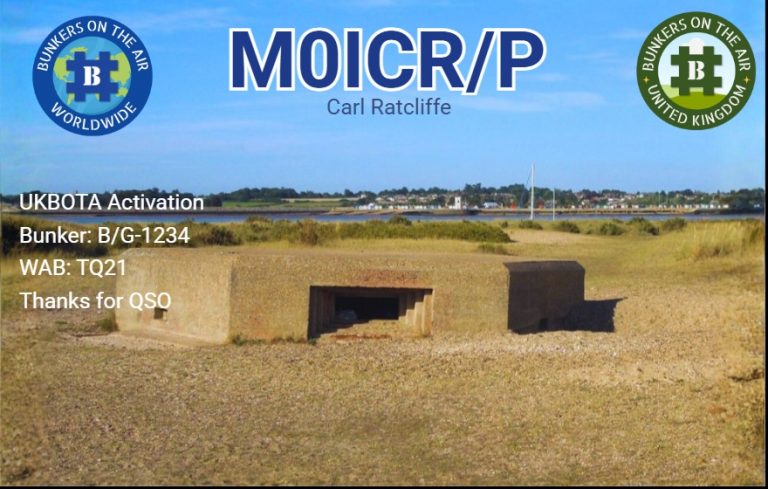
Example
The image below was created in this tool as an example: