
UKBOTA LOGGING DASHBOARDS

(click the logo to go straight to WWBOTA Logger)
Important Notice
The UKBOTA logging dashboards will be retired at midnight on 31 August 2026 and will be replaced by the WWBOTA global logging solution (see link above). If you have the old UKBOTA logger dashboard bookmarked, you'll land on this notice — please update your bookmarks to the WWBOTA logger.
Your Transition +
- None of your logging data is lost — all previous QSOs and logs uploaded via the UKBOTA dashboards remain available on the WWBOTA logger.
- You will need a WWBOTA account if you do not already have one. It's easy to create one — see the WWBOTA homepage here.
- The WWBOTA interface is similar but not identical to the UKBOTA dashboards. We recommend you take time to familiarise yourself with it.
- Your awards and scoring integrity are completely unaffected by this change — in fact, the awards claims system already migrated to the WWBOTA site some time ago, so this is simply the last piece falling into place.
- Will we still have scoring widgets for UK events? Yes — not only will scoring widgets continue for UK events and be displayed in WWBOTA Logger, this capability has already grown beyond UKBOTA. We've built scoring widgets for events run by other national schemes (including an OKBOTA event), and for international events like Bunkerfest and Winterfest.
Why Are We Doing This? +
First, it's probably worth explaining why UKBOTA had its own logging solution at all. It really boils down to the evolution of UKBOTA and its growth into WWBOTA.
UKBOTA was the first Bunkers on the Air scheme. When we began in October 2023, there was no bespoke bunkers logging solution, so we wrote our own — BunkerBase, later replaced by BunkerBase 2 once we had a better feel for what users needed.
ONBOTA joined UKBOTA in July 2024 and WWBOTA was born. The missing link was a common logging solution. By July 2025, as more countries joined WWBOTA, it became clear we needed a shared, unified platform — this led to the development of WWBOTA Logger. The breakthrough was the creation of a shared WWBOTA API by Steven M1SDH, paired with a new front-end interface by Carl M0ICR. WWBOTA Logger launched in January 2026 and has proved popular with the ever-growing family of WWBOTA member countries and individual users.
What's important to understand is that BunkerBase 2 had already evolved to use this same shared WWBOTA API. In practical terms, that means there's no data to synchronise and nothing to migrate — BunkerBase 2 and WWBOTA Logger have been reading and writing identical data all along. This change is simply a change of front door, not a change of what's behind it.
WWBOTA Logger represents an evolution, not a loss.
Reasons for you
For most users, you will only ever need to remember one login username (your callsign, if you're a licenced radio amateur).
The WWBOTA logging solution contains some improvements over the UKBOTA logging solution, including a fully featured Actions button — give it a try!
Faster improvements for everyone. New features only need to be built once, and every country benefits immediately — UK users get new functionality at the same time as the rest of the world, rather than waiting for it to be ported across separately.
Reasons for us
By focussing on a single logging solution for the whole of WWBOTA, it allows us to concentrate our volunteer web development time on one platform. This reduces the maintenance and support burden on us.
Branding and consistency. Focussing on a single worldwide solution assists with global branding, collaboration and reputation.
Resilience. Spreading development and maintenance across more than one volunteer (Steven M1SDH on the API, Carl M0ICR on the front end) means the platform doesn't depend entirely on any one person's time or availability — which is healthier for the long-term future of the programme. In fact we'd love to hea from people with the necessary skills and willing to help from within UKBOTA and from across the entire WWBOTA family. Not only does this spread the load, it means more ideas across a more diverse community - that's a win win!
Fairness across the federation. As more national schemes join WWBOTA, having every country on the same platform keeps things on a level playing field, with no one nation running bespoke tools or features that others don't have.
But I Preferred the UKBOTA Logging Pages +
We understand — change is never popular, especially when something has worked well for you for a long time. The UKBOTA dashboards were built specifically around UK activators and hunters, and some of you will genuinely miss that.
A few things worth knowing:
- This wasn't a decision taken lightly. The UKBOTA logging pages served the UK community well, but maintaining a separate system alongside the growing WWBOTA platform was becoming unsustainable for a volunteer-run project.
- The WWBOTA logger is actively developed. Features that were UKBOTA-only are gradually being added where they make sense globally — so improvements you liked aren't necessarily gone for good, they may simply arrive in a different place.
- Your feedback matters. If there's a specific feature or workflow from the UKBOTA dashboards that you're missing, let us know. We can't promise everything will return identical to what you were familiar with, but we do want to hear what's not working for you and how we might improve this.
- Give it time. Most users who've made the switch tell us the WWBOTA interface takes a session or two to get comfortable with, and then it clicks.
If after that you still feel something important is missing, please send us a Support Ticket.
Remaining Other UKBOTA Website Features +
UKBOTA believes that having a United Kingdom identity, proudly sitting within the WWBOTA global community, is important. Our website at ukbota.net is not disappearing, and we will continue to offer all the features you already know and love — guides, mapping, bunker lists and much more.
Presently, two areas of the UKBOTA site will still require a UKBOTA account to access: the UKBOTA Atlas and the UKBOTA New Bunker Proposals tool. We are actively looking at how we might move both of these features to the WWBOTA platform, but we have no timeline for these transitions at present.
Need Help? +
We recommend the following sequence. Not only is this probably the quickest way for you to get an answer, it also respects the fact that UKBOTA and WWBOTA are run entirely by volunteers giving up their spare time — not a commercial support desk.
- Give it time — have a proper look at what the WWBOTA solution can do. Reading the FAQ and help guide will be useful.
- Ask other users on our social media platforms — WhatsApp and Facebook. The community is generally very willing to help, and often faster than we can be.
- If all else fails, please send us a Support Ticket. Please note these are answered by a small number of volunteers in their spare time, and it may take up to 72 hours for us to respond. Please describe the problem in full — tickets such as "It doesn't work" or "I don't like it" give us nothing to work with and simply slow things down for everyone.
Thank You! +
Thank you for sticking with us as we go through this change. We know change isn't popular for everyone. Give it time, and we're confident you'll see the benefits and be as happy as the many others who have already migrated to the WWBOTA Logger — remember, it's still the same house, just one front door for everyone now.
This decision has been taken by the UKBOTA MT after careful consideration, and the transition itself is now complete. Support Tickets remain very welcome for help settling in to the WWBOTA logger — but please note this isn't a decision we're looking to revisit.
M0ICR
for UKBOTA MT
A QUICK GUIDE TO WWBOTA LOGGER
(click the logo to go straight to WWBOTA Logger)
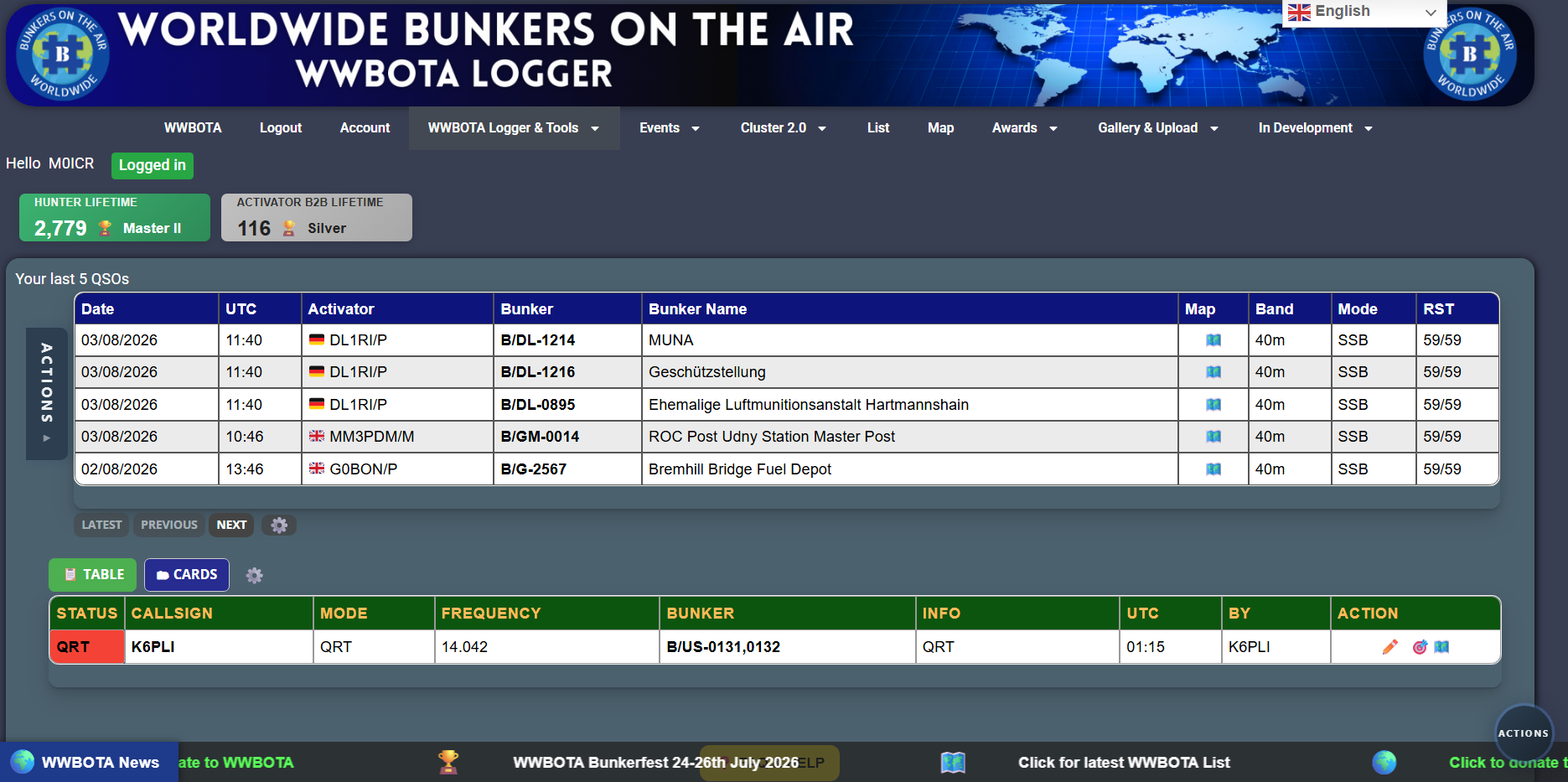
From top to bottom of the screenshot below
1. WWBOTA Logger Banner (note the translation tool)
2. WWBOTA Navigation Bar.
3. Welcome notice which also confirms you are logged in.
4. Scoring widgets. WWBOTA global widgets and to the right space for event scoring widgets.
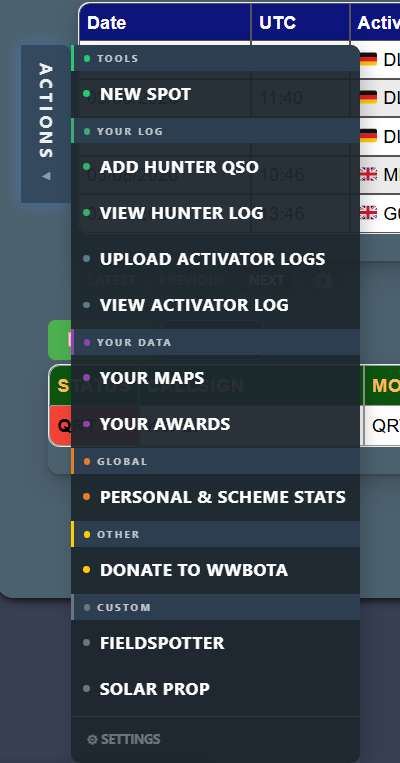
5. A quick visual record of your last five QSOs. Click the map icon to see the bunker plotted on a map. The Actions button on the far left is where you’ll find all the useful functions — see the expanded screenshot below. The Latest, Previous and Next buttons let you page through your other QSOs. The cog lets you personalise your colours and fonts.
6. The cluster view. Note the Table and Cards buttons – these allow you to toggle between a Tabular and a Card based view of the WWBOTA cluster. Note the Pencil (edit a spot), Target (copy a spot to a hunter record form) and the map icon.
7. Note the yellow FAQ and Help button (yellow).
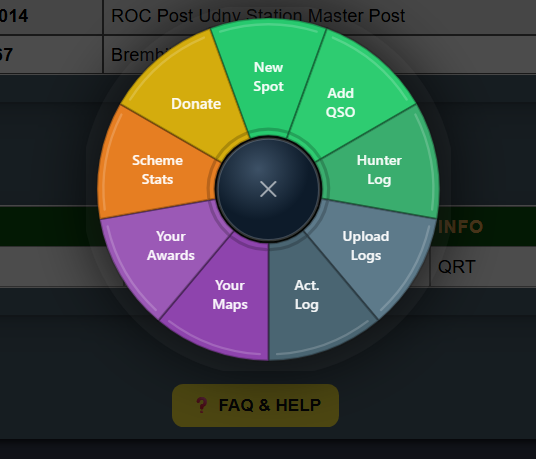
8. Note the Actions button in the bottom right corner, this works in a similar way to the actions button already described but opens the choices as a circular menu widget in the middle of your screen (see the third screenshot)
(C) 2026 UKBOTA – UK BUNKERS ON THE AIR